---
title: Crestron integration
description: Seamlessly integrate Crestron and Joan for efficient room scheduling and control.
---
[Skip to content](https://support.getjoan.com/knowledge/crestron-integration#main-content)
[Submit a ticket](https://support.getjoan.com/knowledge/kb-tickets/new?hsLang=en)
[](http://www.getjoan.com/)
Open main navigation
Close main navigation
- [Submit a ticket](https://support.getjoan.com/knowledge/kb-tickets/new)
How can we help you?
- There are no suggestions because the search field is empty.
1. [Help Center](https://support.getjoan.com/knowledge?hsLang=en)
2. [Workplace management](https://support.getjoan.com/knowledge/workplace-management?hsLang=en)
3. [Integrations](https://support.getjoan.com/knowledge/workplace-management?hsLang=en#integrations)
# Crestron integration
## Seamlessly integrate Crestron and Joan for efficient room scheduling and control.
Requirements for Integration:
- A Crestron [TSW-1070](https://www.crestron.com/Products/Control-Surfaces/Touch-Screens/Large-Touch-Screens/TSW-1070-B-S), [TSS-1070](https://www.crestron.com/Products/Control-Surfaces/Touch-Screens/Large-Touch-Screens/TSS-1070-B-S), [TSW-770](https://www.crestron.com/Products/Control-Surfaces/Touch-Screens/Medium-Touch-Screens/TSW-770-B-S) or [TSS-770](https://www.crestron.com/Products/Control-Surfaces/Touch-Screens/Medium-Touch-Screens/TSS-770-B-S) device
- A [MyJoan account](https://my.getjoan.com/)
### **How to integrate a Crestron device with Joan**
To begin, make sure your Crestron device is connected to the internet.
Once your Crestron device is connected to the internet, follow these steps to integrate it with Joan on Tablet feature:
- On your Crestron device, open a browser of your choice and visit [https://tablet.getjoan.com/](https://tablet.getjoan.com/)
- You will be presented with a pairing PIN code
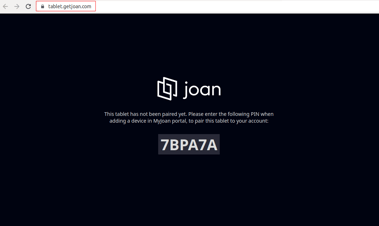
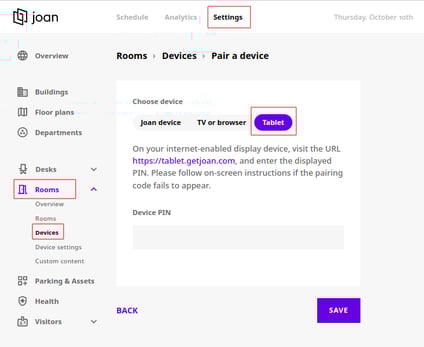
- Open [MyJoan](https://my.getjoan.com/) account on your computer and navigate to “**Settings**” -\> “**Rooms**” -\> “**Devices**”. Here is a [direct link to that page](https://my.getjoan.com/settings/rooms/devices). Please note that MyJoan account should not be opened on a Crestron device, but on another laptop or PC.
- Click on “**Pair a device**”
- Select the "**Tablet**" tab
- Enter the PIN that you see on your display and click “**Save**”
- 
- In the **Devices** tab, you will be able to see the newly-added Crestron tablet. Click on the device
- Enter the name for the device
- From the drop-down menu, select the room/resource that you wish to manage with the device
- Click “**Save**”
### What Happens After the Integration?
Once the integration is complete, your Crestron device will be fully connected to Joan, using the [Joan on Tablet](https://support.getjoan.com/knowledge/joan-on-tablets?hsLang=en) functionality. You will be able to manage meeting room bookings effortlessly via your Crestron device.
- [Getting started](https://support.getjoan.com/knowledge/getting-started?hsLang=en#main-content)
- [General information](https://support.getjoan.com/knowledge/getting-started?hsLang=en#general-information)
- [Joan Devices](https://support.getjoan.com/knowledge/getting-started?hsLang=en#joan-devices)
- [Room management](https://support.getjoan.com/knowledge/room-management?hsLang=en#main-content)
- [Account configuration](https://support.getjoan.com/knowledge/room-management?hsLang=en#account-configuration)
- [Room configuration](https://support.getjoan.com/knowledge/room-management?hsLang=en#room-configuration)
- [Microsoft 365](https://support.getjoan.com/knowledge/room-management?hsLang=en#microsoft-365)
- [Exchange](https://support.getjoan.com/knowledge/room-management?hsLang=en#exchange)
- [Google](https://support.getjoan.com/knowledge/room-management?hsLang=en#google)
- [iCalendar](https://support.getjoan.com/knowledge/room-management?hsLang=en#icalendar)
- [Using Joan in a shared environment](https://support.getjoan.com/knowledge/room-management?hsLang=en#using-joan-in-a-shared-environment)
- [Buildings](https://support.getjoan.com/knowledge/room-management?hsLang=en#buildings)
- [Interfaces](https://support.getjoan.com/knowledge/room-management?hsLang=en#interfaces)
- [Integrations](https://support.getjoan.com/knowledge/room-management?hsLang=en#integrations)
- [Troubleshooting](https://support.getjoan.com/knowledge/room-management?hsLang=en#troubleshooting)
- [Joan devices](https://support.getjoan.com/knowledge/joan-devices?hsLang=en#main-content)
- [Device configuration](https://support.getjoan.com/knowledge/joan-devices?hsLang=en#device-configuration)
- [Device settings in the Joan portal](https://support.getjoan.com/knowledge/joan-devices?hsLang=en#device-settings-in-the-joan-portal)
- [Custom content](https://support.getjoan.com/knowledge/joan-devices?hsLang=en#custom-content)
- [Using Joan with 3rd party devices](https://support.getjoan.com/knowledge/joan-devices?hsLang=en#using-joan-with-3rd-party-devices)
- [Mounting your Joan device](https://support.getjoan.com/knowledge/joan-devices?hsLang=en#mounting-your-joan-device)
- [Device troubleshooting](https://support.getjoan.com/knowledge/joan-devices?hsLang=en#device-troubleshooting)
- [Workplace management](https://support.getjoan.com/knowledge/workplace-management?hsLang=en#main-content)
- [Account configuration](https://support.getjoan.com/knowledge/workplace-management?hsLang=en#account-configuration)
- [Additional Desk booking features](https://support.getjoan.com/knowledge/workplace-management?hsLang=en#additional-desk-booking-features)
- [Users](https://support.getjoan.com/knowledge/workplace-management?hsLang=en#users)
- [Integrations](https://support.getjoan.com/knowledge/workplace-management?hsLang=en#integrations)
- [Frequently Asked Questions](https://support.getjoan.com/knowledge/workplace-management?hsLang=en#frequently-asked-questions)
- [Visitor Management](https://support.getjoan.com/knowledge/visitor-management?hsLang=en#main-content)
- [General information](https://support.getjoan.com/knowledge/visitor-management?hsLang=en#general-information)
- [Devices](https://support.getjoan.com/knowledge/visitor-management?hsLang=en#devices)
- [How to invite your visitors?](https://support.getjoan.com/knowledge/visitor-management?hsLang=en#how-to-invite-your-visitors)
- [App permissions](https://support.getjoan.com/knowledge/visitor-management?hsLang=en#app-permissions)
- [Workplace Digital Signage](https://support.getjoan.com/knowledge/workplace-digital-signage?hsLang=en#main-content)
- [Setting Up Your Digital Signage](https://support.getjoan.com/knowledge/workplace-digital-signage?hsLang=en#setting-up-your-digital-signage)
- [Compatible Hardware and Supported Media](https://support.getjoan.com/knowledge/workplace-digital-signage?hsLang=en#compatible-hardware-and-supported-media)
- [Using Joan Workplace Digital Signage in Practice](https://support.getjoan.com/knowledge/workplace-digital-signage?hsLang=en#using-joan-workplace-digital-signage-in-practice)
- [Mobile application](https://support.getjoan.com/knowledge/mobile-application?hsLang=en)
- [Analytics](https://support.getjoan.com/knowledge/analytics?hsLang=en)
- [Plans & Billing](https://support.getjoan.com/knowledge/plans-billing?hsLang=en#main-content)
- [Subscription plans](https://support.getjoan.com/knowledge/plans-billing?hsLang=en#subscription-plans)
- [Billing information](https://support.getjoan.com/knowledge/plans-billing?hsLang=en#billing-information)
- [Prepaid subscription codes](https://support.getjoan.com/knowledge/plans-billing?hsLang=en#prepaid-subscription-codes)
- [Ordering and shipping](https://support.getjoan.com/knowledge/plans-billing?hsLang=en#ordering-and-shipping)
- [Returns and cancellations](https://support.getjoan.com/knowledge/plans-billing?hsLang=en#returns-and-cancellations)
- [Information for resellers](https://support.getjoan.com/knowledge/plans-billing?hsLang=en#information-for-resellers)
**Support Hours:**
**08:00–24:00 (CET)**
Monday–Friday
Copyright © 2025, Visionect d.o.o.