
Sharing a Google Room Resource Calendar with a Service Account
Due to the read/write permissions Joan needs, it is essential to grant appropriate access to the service account designated for your MyJoan. This guide outlines the process of sharing a room resource calendar with the necessary permissions.
1. Accessing the Room Resource Calendar
-
Navigate to calendar.google.com and ensure you are logged in with a Global Administrator account.
-
Locate the desired room resource calendar under the "Other calendars" section on the left-hand menu.
-
If the room resource is not visible, hover over the + icon next to "Other calendars" and select Browse resources.
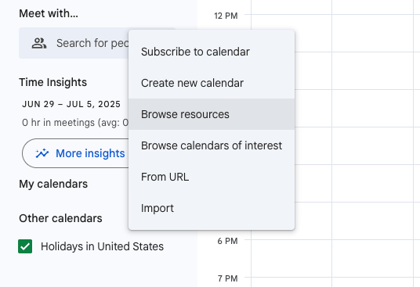
-
Check the box next to the desired resource to add it to your calendar view.
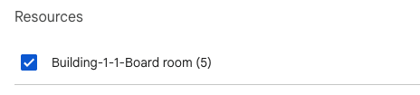
2. Configuring Sharing Permissions
-
Once the room calendar is visible on your main calendar page, hover over its name and click the three dots that appear.
-
Select Settings and sharing from the menu.
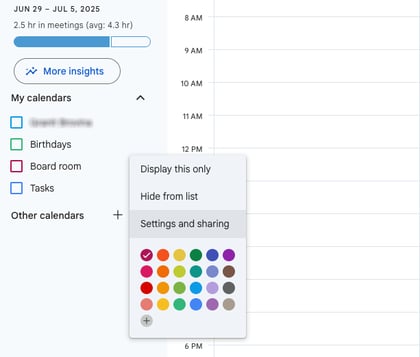
-
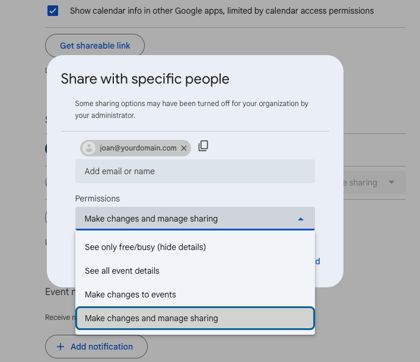
In the settings menu, scroll down to the Shared with section and click Add people and groups.
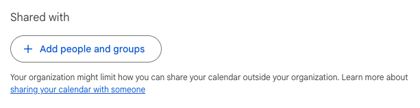
-
Enter the email address of your designated service account.
-
Under the "Permissions" dropdown, select Make changes and manage sharing.
-
Click Send to finalize the sharing settings.
Your MyJoan account will now have the necessary permissions to manage the room resource calendar.
If you encounter any issues, please contact support@getjoan.com.